

Set Up a Death Counter
A death counter is three small commands: one that counts a death, one that shows the score without changing it, and one that resets it for the next game. It’s built on the chatbot’s counters, so the count survives stream restarts.
The counting command
Section titled “The counting command”-
From the bot command dashboard, open the “Custom commands” tab and click “Add new command”.
-
Name the command
death, set the “User level” to Moderator so random chatters can’t inflate your death count, and enter this reply:Deaths: $(count deaths)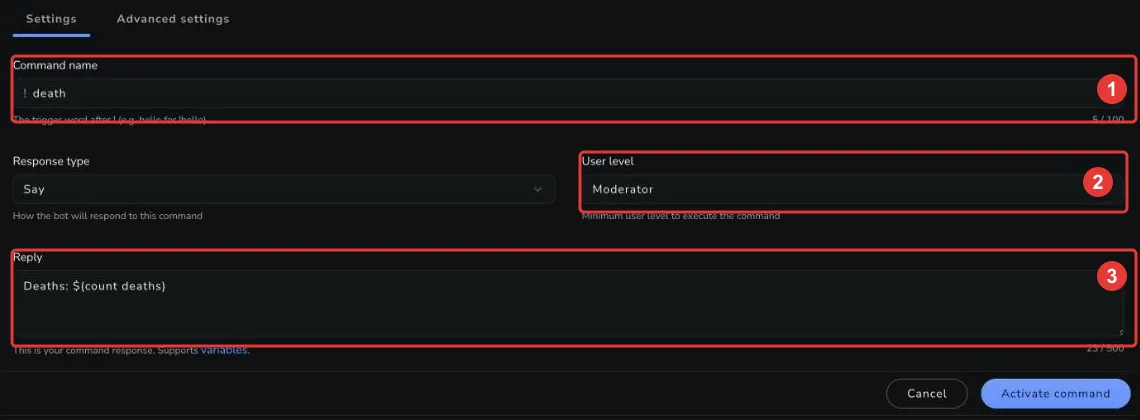
-
Click “Activate command”.
Every use of $(count deaths) adds 1 to the counter and prints the new total — so each !death in chat is one more death:


Checking the score without counting
Section titled “Checking the score without counting”For a command everyone can use, read the counter with $(getcount) — it outputs the value without adding to it. Create a second command named deaths (User level: Everyone) with the reply:
We have died $(getcount deaths) times so farCorrections and resets
Section titled “Corrections and resets”The counter takes modifiers: +n adds, -n subtracts, and a bare number sets it. A moderator-level reset command with the reply below puts the counter back to zero between games:
Death counter reset ($(count deaths 0))You can also fix miscounts on the fly — $(count deaths -1) in any moderator command takes one back.
Managing counters
Section titled “Managing counters”Counters are created automatically the first time they’re used and persist until you change them. You can view and edit every counter — including deaths — in the dashboard under Chatbot → Counters, and moderators can use the !editcounter default command from chat.
Related
Section titled “Related”- Counters: How counters work, with the full syntax.
$(count)and$(getcount): The two variables this guide is built on.- Custom Commands: Everything else you can do with custom commands.