

Emote Combo Module
TwitchKick
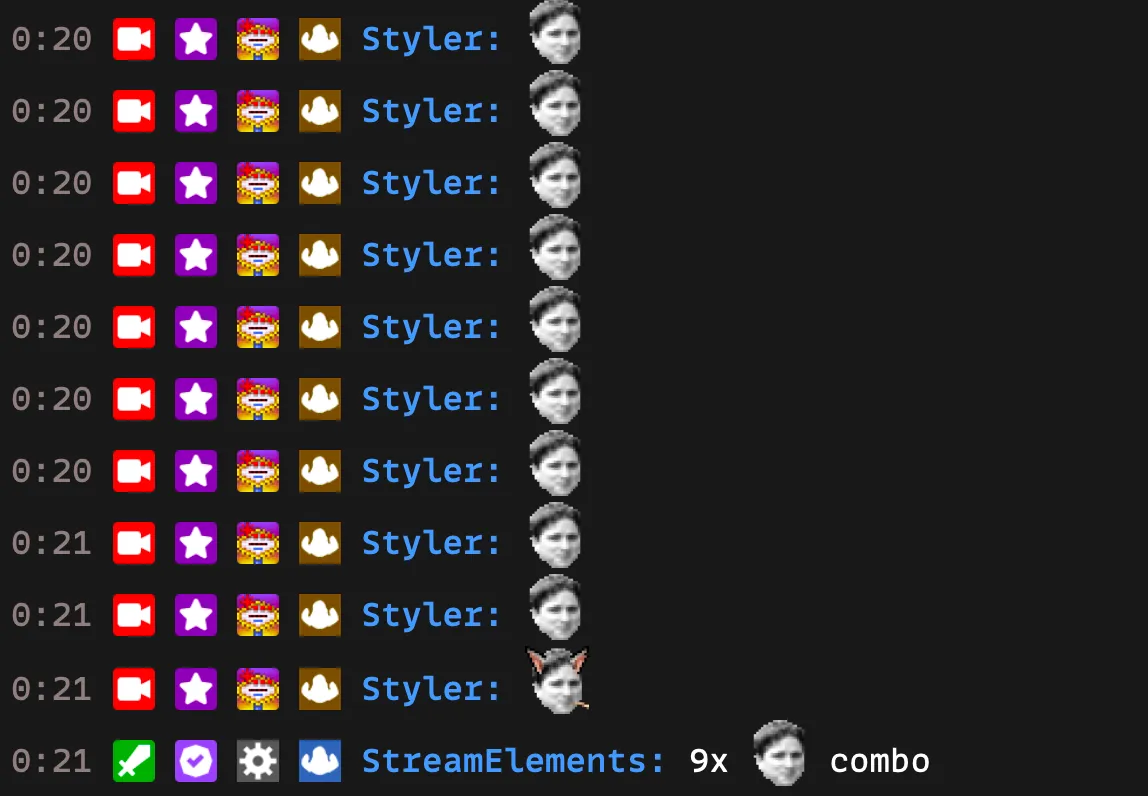
The Emote Combo module tracks chains of consecutive messages containing the same emote, and announces the streak when someone finally breaks it.
How It Works
Section titled “How It Works”The Emote Combo feature activates automatically when viewers start sending consecutive emote messages in chat:
- A viewer initiates the combo by sending a message containing an emote.
- Each following message that contains the active emote extends the combo. A message counts once, no matter how many times the emote appears in it.
- The combo does not require different viewers — the same viewer can keep a combo going on their own.
- The combo ends when a message is sent that does not contain the active emote. If the final count reached the minimum combo count, the bot announces the combo.
Example
Section titled “Example”

Configuration
Section titled “Configuration”Streamers can customize the following settings in the StreamElements dashboard:
- Whether the module is enabled
- Minimum combo count before the bot responds (default: 3)
- Cooldown between bot responses (default: 30 seconds)
- Tiered messages: a list of messages, each with a minimum count — the message with the highest minimum at or below the final combo count is used
The combo messages support the following placeholders:
| Placeholder | Description |
|---|---|
{user} |
The login name of the user who broke the combo |
{count} |
The final combo count |
{emote} |
The combo emote |
Q: Can I use custom emotes for the Emote Combo? A: Yes, both Twitch global emotes and channel-specific emotes work with the Emote Combo feature.
Q: Is there a limit to how long a combo can be? A: No