Banned Words Filter
The Banned Words filter is a tool that helps maintain the chat environment by removing messages that contain banned phrases and patterns. This filter is highly customizable and supports the creation of multiple groups, each with its own set of banned phrases.
These phrases can be simple text or they can be regular expressions (regexp), providing a high degree of flexibility in defining what constitutes a banned phrase. For example, you could ban a specific word, or use a regular expression to ban any word that contains a certain sequence of characters.
To use this filter, simply define your groups and their associated banned phrases or patterns. Any incoming message that matches a banned phrase or pattern in any group is automatically moderated according to that group’s settings.
Settings
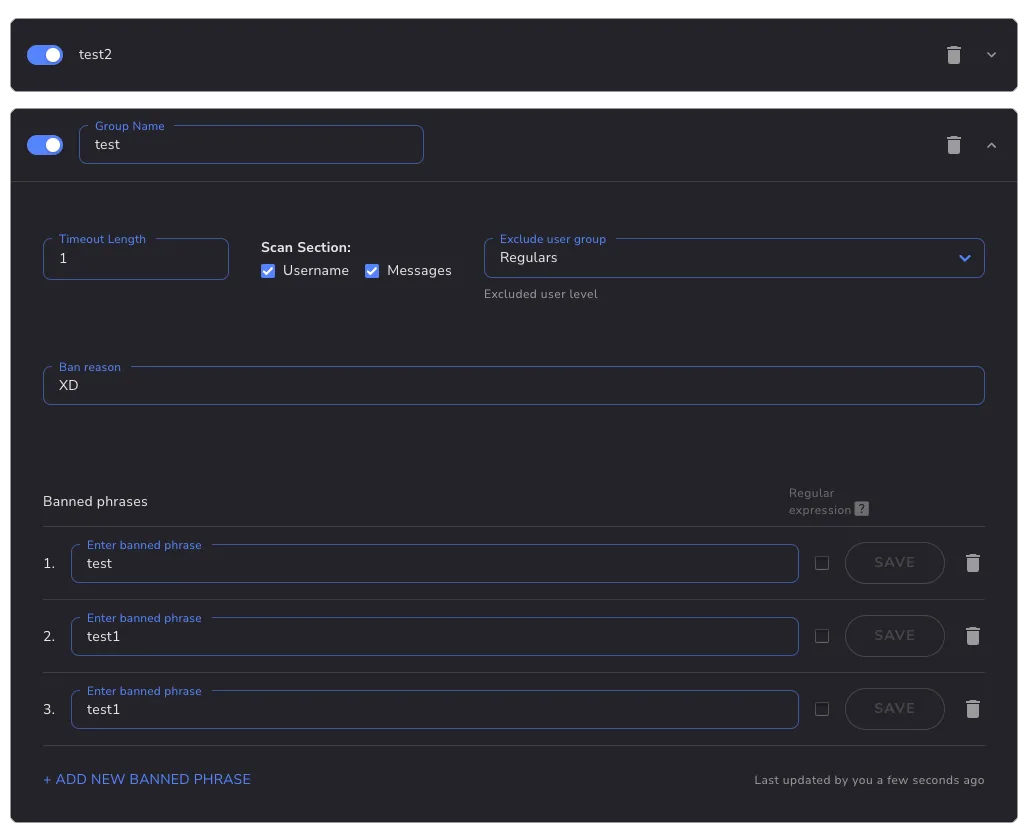
Section titled “Settings”Banned phrases are organized into groups. Click the Add Group button to create a new group (named Group 1 by default). Each group has its own settings:
| Setting | Description |
|---|---|
| Timeout length | Controls the action taken when a phrase in this group matches — a timeout for the configured number of seconds, message deletion only (timeout of 0), a permanent ban, or a warning plus deletion (Twitch only). This per-group value takes precedence over the filter-wide timeout. See What happens on a violation. |
| Scan section | Which parts of a chat message the group checks: the message text, the sender’s username, or both. |
| Exclude user group | A user-level threshold. Users at or above the selected level (for example, Moderators and above) are not checked against this group. |
| Ban reason | The moderation reason attached to the timeout or ban. |
| Banned phrases | The phrases the group matches messages against. Each entry is either plain text or a regular expression. |
When phrases from several groups match the same message, the harshest action wins: a ban beats any timeout, and between timeouts the longest one is applied.
Phrase matching
Section titled “Phrase matching”Text phrases are matched case-insensitively and only against whole words — bad matches “bad” but not “badge”. Text phrases also support the * wildcard, which matches any run of non-space characters.
Regular expressions use Go’s RE2 syntax, which does not support backreferences or lookaround. Patterns are case-insensitive by default; to take full control of the flags, start your pattern with an inline flag group such as (?s) — the default case-insensitivity then no longer applies. Enter patterns bare, without surrounding slashes: in /b[aá]dword/ the slashes would be treated as literal characters and the pattern would never match.
Examples
Section titled “Examples”- Plain phrase:
badword— removes any message containing the word “badword”, in any capitalization. - Regular expression:
b[aá]dword— also catches spelling variants such as “bádword”.